e-Lite 2015: Postponement Notice

Due to the CBSE Avishkar Quiz being held on 9 July 2015, the Quiz, Crossword and Hardware events have been postponed to Friday, 10 July 2015. The timings for other events have also changed. This is the updated schedule for e-Lite 2015. The date, time and venue for the Junior Quiz Finals, to be held next week, shall be announced tomorrow.

11714281_10200702697125139_441358100_n

Please inform your partners and fellow participants of the change.

e-Lite 2015: Creative Event Update

Participants of e-Lite 2015 please note:

  1. There is no registration for the Creative Event Prelims. All the entries are to be sent to us at elite2015@exunclan.com
  2. The prompt for the Creative Event Prelims remains the same. The link to the prompt is: bit.ly/eLite2015CE
  3. The deadline for the Prelims is 15th July, 2015. The date, details, and topic for the onsite Creative Event finals will be declared after the results of the Prelims.
  4. Entries submitted already will be considered and need not be sent again.

Good luck!


Blender: A free yet feature rich 3D modelling tool

So, you want to learn 3D modelling and rendering, and downloaded Blender, one of the few free 3D modelling software available on the Internet. If you’re using a 3D modelling software for the first time, it might seem pretty daunting, but it’s something made for everyone, novices to professionals alike.

download

What is it?

Founded by Ton Roosendaal in May 2002, blender is a completely free professional open source 3D modelling, graphics and animation suite, but in no way inferior to anything else out there. You can use to create animated movies, 3D printed models, fluid and smoke simulation, video editing, UV unwrapping, texturing, raster graphics editing, rigging and skinning, particle simulation, soft body simulation, sculpting, match moving, compositing, video games or even just amazing artwork. Blender shows off the entirety of all there is to 3D design. Modeling and animation along with rigging, simulation, rendering, compositing and motion tracking. Blender even integrates a video editing and game creation system. It is helpful to know Python scripting (but not needed at all to be efficient in Blender) for customizing the application and writing specialized tools for yourself and others.

It’s available on most platforms, so that’s an extra plus. Its high customizability is pretty cool too, as you can set the display screen according to your preferences.  It also has an integrated game engine.


Why should I get blender?

You start from scratch, in a neat user interface, and – unless you happen to be an Autodesk Maya expert – should expect that you are going to have to read some manuals, follow the tutorials, and do lots of homework. Lots. But since Blender is completely free, it’s worth the effort if you are serious about 3D art and animation, whether amateur or pro, and have a lot of artistic talent and perseverance.

Unlike most 3D and 2D design software, Blender seems to favor people who are gamers or programmers, by incorporating keyboard shortcuts for almost everything, making shifting through tasks a breeze.

For example, if you hit the Scale button with your mouse pointer, you will find it near impossible to scale your selected item with any precision. Use the shortcut S and you now have meticulous control.

With Blender, we can model using basic mesh shapes – spheres, cubes, cylinders etc. which we can extrude and reshape. There are tutorials to learn how to add textures and patterns, and even changing colors seems to be quite intimidating until you learn it. What you need is dedication and hard work.

For whom?

Blender is well suited to individuals and small studios who benefit from its unified pipeline and responsive development process; but if you’re a novice, and hope to have your project completed in hours rather than months, Blender is definitely a better choice than painfully fishing out your wallet for the $ 3500 Autodesk Maya or even the $ 50 3D Studio.

Even if you’re a Maya user and a pro, you might get Blender (it’s free, remember?) for a spin. Blender’s ease of use is catching up fast with programs for professionals. Once you get the skill and know what to do, you can match up with what can be done Maya and 3DS Max and other high-end, high-price 3D modelling and animation programs.

Blender is an excellent 3D design software with great tools and enormous functionality. With the addition of the fact that it is completely free making it easy for anyone to jump right in and start learning adds that much more respect for the developers of this amazing app, even though it is a bit hard to start with and even harder to master. Although you will have to take your time watching tutorials or reading documentation, learning Blender will definitely be worth your time in the end.

Happy Blending.


e-Lite 2015 Creative Event Prelims

The Exun Clan presents Exun e-Lite 2015 Creative Event, open to all students from classes 6th to 11th.

Preliminary round entries will be judged by alumni and the best few entrants will be part of a final round which will take place at school.

Here is the preliminary prompt for e-Lite 2015’s Creative Event: http://bit.ly/eLite2015CE

Please note that participation is strictly individual. Team entries will not be considered. An FAQ section with complete details on the event has been included in the prompt, but please feel free to contact us at exunclan@gmail.com with any questions or queries you may have, or if you wish to use a software program not listed in the prompt.

The deadline for submission of entries is 15 July 2015.

Digital Wellness Online Challenge – being safe in cyberspace

Digital India Week is being launched by the Hon. PM on 01 July 2015. On this occasion, Dept of Electronics and IT with support from Intel will be executing a ‘Digital Wellness Online Challenge’. This is an initiative to help children across the country become more responsible in their use of Internet. It aims to anchor students’ well-being in cyberspace by empowering them with information and application of the principles of cyber-safety, cyber-security, and cyber-ethics.


The objective is to reach out to each and every child so that they learn to be safe in cyberspace; and we need help from EVERY SINGLE PERSON we know in education to make this happen! We request all of you to mobilize all possible channels to get maximum children in private and government schools from grades 6-12 to attempt this quiz post 01 July.

The quiz will be available in English and Hindi. While each participant will gain a Digital India Certificate, 4 winners per state will be declared as Digital Wellness Champions and get an opportunity to interact with key leaders during the Digital Week Celebrations later in the month.

The quiz can be accessed from: http://quiz.digitalindia.gov.in/

Details are also available at –

http://www.digitalindia.gov.in/

http://www.digitalindia.gov.in/active-quiz

http://rmsaindia.org/en/digital_india.html

e-Lite 2015 Postponed

Dear all

In lieu of the school rescheduling summer vacations, which now begin from Friday, May 15, Exun Clan will conduct e-Lite 2015 in the first week of July (when the school re-opens).

However, registrations will remain open and the submission date for the Create Event is still 18th May.
We, not I

Surround Sound

Whenever assembling a proper home theatre or a gaming system, audio is an essential component. A true audiophile whether a hardcore gamer a TV enthusiast, never compromises the true surround sound experience. However, components like bulky speakers and sub woofers may not always be economical and they require much space. Surround headsets may be the best alternative; they provide highly immersive experience while not being heavy on your wallet and real estate. The whole world of Surround audio solutions may be divided into two categories, one being ‘True surround’ and other being ‘Virtual surround’.


What’s The Difference?

As sound generated in stereo headphones is originated from the drivers (speakers) which are right next to ear rather the Television itself, stereo headphones may sometimes have a detached feel to them which may lead to an unpleasant audio experience. Sometimes, lack of synchronization may also be experienced between the audio and frame (visual) reproduction. This issue is addressed by True surround headsets by implementing multiple drivers at different angles broadcasting audio, while virtual audio solutions feature complex audio processing to stimulate multiple direction affect to tackle this.

SurroundSoundPic

True Surround Sound follows the same ideology that of Surround sound speakers; it uses various drivers (speaker) positioned at various angles in each headphone cup which control specific direction. Early models offered quadraphonic sound (4 channels). However, now days mostly all models offer 5.1 or 7.1 surround (.1 signifying one sub woofer). They solved the problem of unnatural audio, as sound comes in from all different angles, the audio no longer appears to originate from the head as in case of stereo headsets.

SurroundSoundPic1

Virtual Surround offers the same experience by artificial means. Similar to stereo headphones, Virtual Surround sound headsets have two drivers (speaker)-one on either side. Therefore the surround audioexperience is offered by  tweaking the pre-amp. This is done by sound card or an external mix-amp, however now days great software utilities like Razer Surround offer surround experience on any stereo headphone by calibration. These pre-amps work on algorithms to divide sound into smaller segments. It offsets the sound and volume from one driver to the other providing a feel of direction to the brain. These algorithms may differ from manufacturer to manufacturer and therefore the surround sound experience may also vary. These headphones basically redirect emanating sound to the outer edge of the ear which enables the sound to roll in over a period of time working somewhat similar to True surround sound. This generates a feel that the sound originates from the visual source rather than the user’s head.


Disadvantages of Surround Sound Headphones.

As True surround sound uses multiple drivers which are located at different angles, it provides a more promising experience. This may be a real benefit competitive gaming as sound placement can turn out to be the difference between triumph and defeat. However, there is also a downside of True surround headsets; as manufacturers utilize multiple driver and sound processing while keeping the cost low, it may result in inferior built quality than Virtual surround headsets. Due to limited supply of power and larger drivers or more number of drivers, the overall sound output may be quite less and may result in a rather unpleasant experience.

Capture

As Virtual surround utilizes two drivers-one for each side, this results in cost reduction and better built quality relative to True surround. As the majority of the work load is on the mix-amp or the pre-amp the cost of higher end driver and components is lessened. Users already having a decent pair of headset can also purchase external pre-amps or sound cards make use of this technology. Astro provides an external mix-amp separately at a low cost; however a new alternative to this is the Razer Surround software utility which calibrates a pair of stereo headset to operate in surround 7.1 surround mode. Still, a pair of certified Virtual surround headphones is recommended to achieve the best possible result. Though True surround and Virtual surround may seem a good alternative they have a hard time living up to the ideal audio fidelity offered by a Surround Sound System. While multiple drivers and advanced positioning may produce a surround effect, it cannot recreate the physical distance nor can it replicate the wide range of tones created by a large speaker. Realistically, certain degree of compromise has to be made keeping in mind the physical and economical constraints. For some users full physical Surround Sound setup may not be viable solutions, to them True or Virtual surround sound may be a good alternative.


GPU Overclocking Guide

All of us want the best out of our hardware whether it is our PC, mobile phone or any other mobile device. However, we hardly ever use a device to its full potential. Overclocking is the art of pushing the potential of graphics card and extracting the maximum potential of electronic components. The device supplied by manufacturers are shipped with certain factory settings which are same for the models of the same SKU, however the maximum potential of each device is different. In case of  semiconductors, processors and primary all the electronic devices, the manufacturers use a process called binning for the production. This is basically testing each model (as in this case processor) and decide which SKU it would match. As per the silicon lottery, no two pieces of silicon can be the same; to equalize this disparity, manufacturers set all the similar processors to a mutually achievable clock speed. It is up to the user to whether discover the true potential or use the standard settings.


Things to keep in mind before Overclocking

  • As all processors have varying overclocking headroom, the overclock may also differ.
  • As overclocking and overvolting results in excessive heat output, a decent cooling solution would help achieve a higher and stable overclock.
  • Over clocking is dangerous; overvolting may fry your processor  which may not be covered under the manufacturer’s warranty.


Evaluate Current Performance.

 Before making any changes, be aware of the your card’s current performance. You  would have to stress testing your card to learn its performance, I would recommend using Unigen Heaven for this purpose.

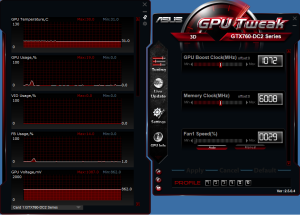
Also, you would be requiring a GPU tweaking utility, my personal favorite is Asus’ GPU Tweak both for Nvidia and AMD based cards.
1


Run Unigen on the native resolution at highest settings and 4xAA to really push your GPU to its limits. Once done, note down the max, min and average frame rate also note down the standard and max clock speed attained during the session and the max temperature as well.

All of the above information acts as the baseline for your overclock.


Ease your way Up

However tempting it may seem to turn up the GPU clock and the Memory clock, it will ruin you card as each card can only operate to a certain frequency. It is always better to adjust your GPU and memory Clock speed in small increments.

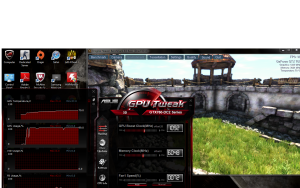
Before adjusting anything, fire up Unigine Heaven in windowed mode and GPU Tweak. This will enable you to adjust settings while the benchmark is in progress.
2

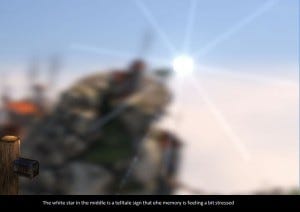
First, increase Memory clock speed in 5MHz increments. Slow progressing will save your card from frying. At some point you will observe instability and finally the system will crash. Check Unigine after every 10MHz for large solid blocks, they are the tell-tale sign for Memory instability. When this does happen, dial back to the last stable Memory clock speed, and that’s your limit to the Memory of you graphics card.4
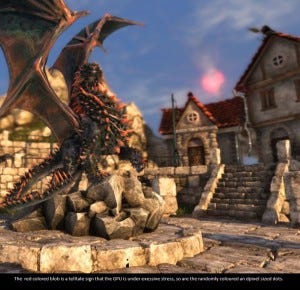
As for the GPU, the overclock would not be that much as compared to the memory. But the performance increase would be more significant. It follows the similar method, just increase the slider in 5-10MHz increments. this time though you may observe strange artefacts when the GPU feels stressed like differently coloured pixel dots and unwanted coloured flashes.
3


Another thing to keep in mind is the temperature, this however, is very subjective you may decide whatever temperature is comfortable with you but try keeping it below 90ºC, as running graphics card at very high temperatures may result in throttling and ultimately results in shortening the lifespan of the card. Personally I like to keep it  around 70ºC-75ºC. In more recent graphics cards by Nvidia which feature GPU Boost 2.0 you can choose maximum temperature and voltage and the GPU overclocks itself keeping all the variables in mind.

When you reach a state when the GPU can’t handle the stress, revert back to the last stable settings, this is the maximum frequency your GPU can handle.

Once you have determined the maximum GPU and memory frequencies, try applying the combination of both the settings. Most probably it won’t work, don’t worry, just identify the type of artefacts and accordingly bring down the  settings. If you are not sure, just bring down the settings by 5-10Mhz. Keep doing this till you reach a stable benchmark.


Stress Test

Once your system gets through the Unigine Heaven benchmark, it is surely a good sign, but to be 100% sure just run another benchmark in loop for another hour or so. I would usually recommend MSI Kombustor. This would certainly make sure that your system would not crash in real world applications.

Another good step is to run GPU intensive games like Titanfall and Battlefield 4, meanwhile you may run GPU Tweak to monitor your graphics card and study the temperature.

Should your GPU not withstand the stress load just reboot and bring down the overclock settings by 5-10 Mhz.
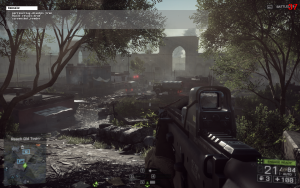
5

Once completing all the steps you are ready to fire up any game and experience smoother and better gaming experience. However, if you don’t get a massive improvement don’t be disheartened; if you do manage to achieve a good overclock it would not be a superbly massive difference; after all, a GTX 660 would not perform like R9 295×2, but you will certainly see a significant improvement in the frame rate, which makes a lot of difference in the smoothness of the game play.

This procedure is somewhat the most basic overclocking method. As I discussed earlier you may increase the overclocking potential of your graphics card by utilizing a decent cooling solution. Once you are comfortable with this and willing to take it to next level, you may try your hands on the dark art of overvolting. However bare in mind that may fry your GPU if not done properly. You may even try hot wiring the graphics card or overclocking using liquid nitrogen should you desire.


Exun e-Lite 2015 Creative Event Prelims

The Exun Clan presents Exun e-Lite 2015 Creative Event, open to all students from classes 6th to 11th.

Preliminary round entries will be judged by alumni and the best few entrants will be part of a final round which will take place at school on 20 May 2015.

Here is the preliminary prompt for e-Lite 2015’s Creative Event: http://bit.ly/eLite2015CE

Please note that participation is strictly individual. Team entries will not be considered. An FAQ section with complete details on the event has been included in the prompt, but please feel free to contact us at exunclan@gmail.com with any questions or queries you may have, or if you wish to use a software program not listed in the prompt.

The deadline for submission of entries is 18 May 2015.