Category Archives: Uncategorized

Bringing back ln(exun)

Every once in a while a website important to you goes down. It’s usually something mundane. Scheduled maintenance, a domain expiring, issues with DNS or some script kiddie taking over your WordPress install because you forgot to update that one WordPress plugin. It’s usually just a small hiccup that you can recover from, over coffee.

This, unfortunately, wasn’t just a hiccup. This was mayday. A word that is not to be used lightly. What happens when you forget to pay your hosting bill and the renewal emails get buried in your inbox? Well, we found out the hard way.

We lost all of ln(exun), permanently, after Bluehost terminated our hosting plan. All those posts dating back 20 years ago all permanently wiped.

Since I’m an alumni, I no longer managed the site actively. I was absolutely shocked and taken aback that all of it just got wiped. Mistakes happen, but right now it was time to salvage whatever we could. But the grief was real: all competition wins, underscore articles, the random stuff posted from 2005 – it was all gone.

Was this the end of the Natural Log of Exun?

• • • • •

Enter “backups”

I vaguely remembered that sometime back in the day I took an XML backup of lnexun’s WordPress. For the record, I have a practice of never deleting anything from my laptop. Instead, I believe in having a larger trash can and that’s how I now have a 2TB Mac which is also full 🫠

For context, WordPress backs up only text content in an XML file with the format “<site>.wordpress.<date>.xml” when you export it from their dashboard. I searched for that exact filename and I was blessed to be able to find a shiny 5.9 MB file called “lnexun.wordpress.2017-05-06.xml” that I backed up on May 6, 2017.

This was a very solid headstart. We have all posts until 2017, but the restoration isn’t complete. At this point we’re looking to restore all images uploaded to ln(exun) along with all posts after 2017. The goal is to get to 100% restoration – as much as we can push it.

Going way back via a different medium

You guessed it, we’re going wayyyyback. But before that, I recalled that we ported our site to Medium in 2018 temporarily as an experiment. This meant we had all posts until April 2018 along with all images until that date.

Thanks to GDPR, I was able to download my entire Medium account dump. This also included the ln(exun) medium publication which had all the posts in HTML.

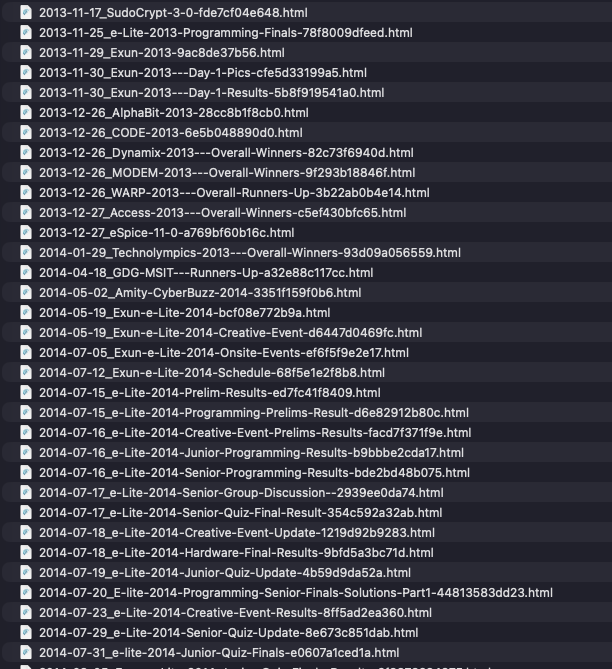
Every post was its own HTML file in the posts folder

Looking at the HTML file, here is what an image tag looked like in all these HTML files.

<img class="graf-image" data-image-id="0*fycT_sxDuHbisPuV.jpg" data-width="1024" data-height="759" data-external-src="http://www.lnexun.com/wp-content/uploads/2015/10/Dynamix-Overall-1024x759.jpg" alt="Dynamix Overall" src="https://cdn-images-1.medium.com/max/800/0*fycT_sxDuHbisPuV.jpg">

Focusing on two very key attributes here, we have the src attribute which hosts it on the Medium CDN but most importantly we have the data-external-src attribute which tells me where that image was placed exactly at the time of export.

For context, if we can just put the correct images in the wp-content/uploads/<year>/<month>/<image_name> path we can retroactively have every single image working in every single post.

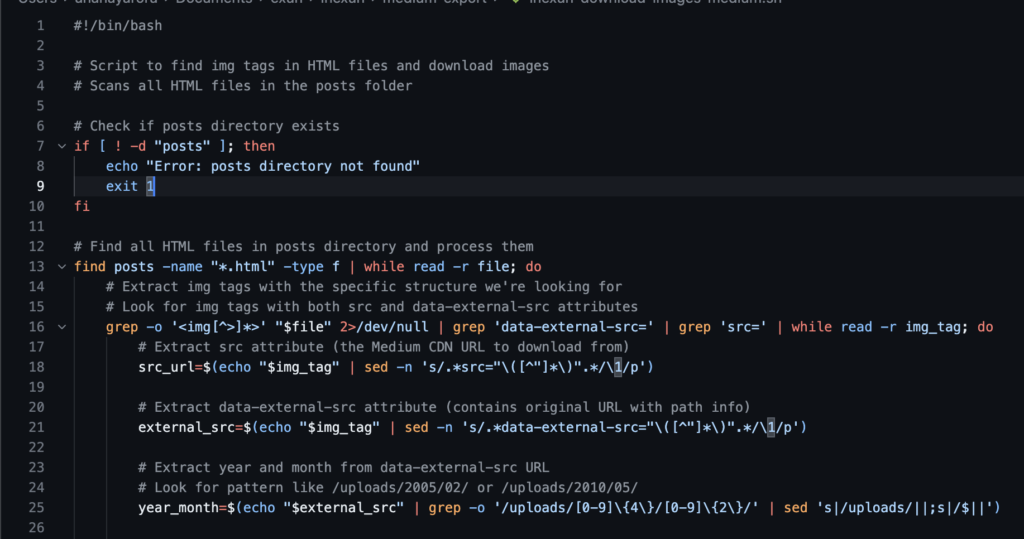
This was absolutely perfect. To sum it up we now have the images from Medium CDN’s and also the path where have to place them. It was now time to bust out Cursor and write that shell script to automatically scan for these tags, get the correct attributes, download the images and place them in the correct folder

Amazing. We now have all the images until 2018 🎉

Actually going back to 2018

Now that we have all images until 2018 and posts until 2017, we can now get the rest. I didn’t want to export the remaining ~8 months of posts from the Medium between 2017 and 2018, since we’re actually going wayback here (the moment we’ve been waiting for) and we can get the rest in one pass.

The problem with the Wayback Machine is that every request is painfully slow, and there is no guarantee if we’ll find all the posts or not – but we’ll try our best. Internet Archive is always the last option.

To start off, we first need to know what times did the Wayback Machine index ln(exun). The wayback machine has the CDX API. CDX is a special index format and API that the Wayback system uses to list and look up archived captures of web pages.

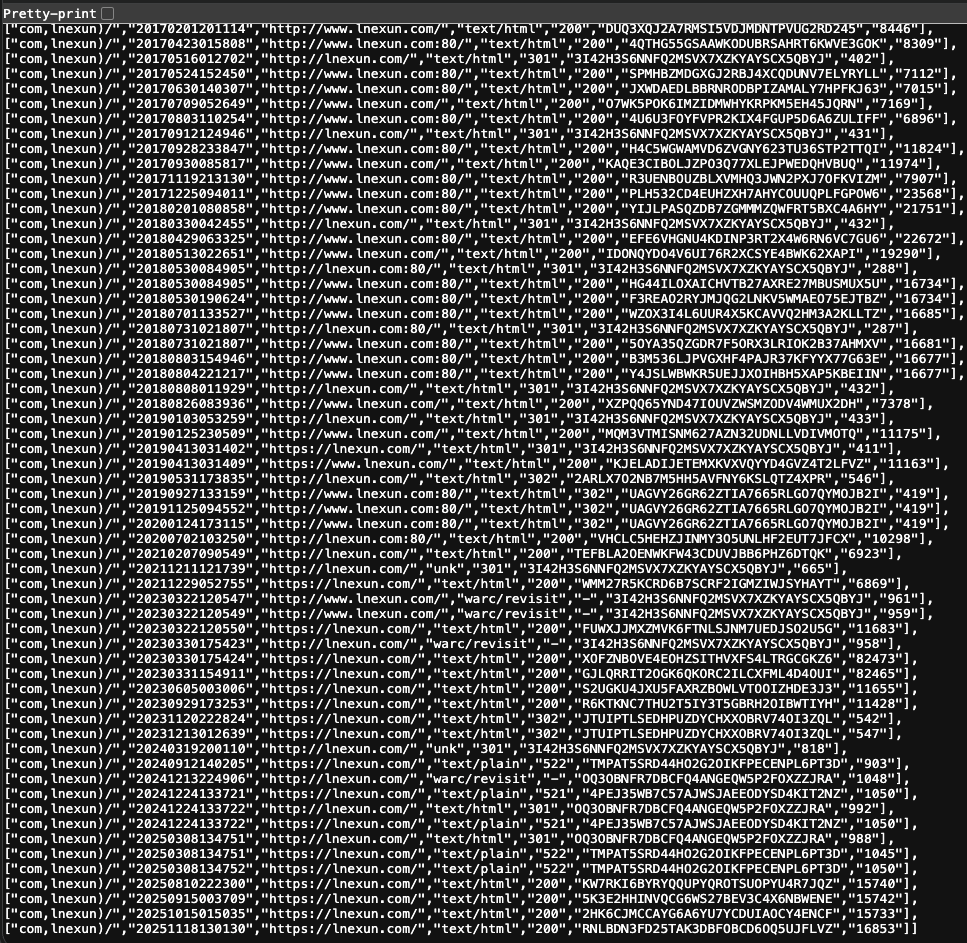
Requesting ln(exun)’s CDX entries we see a bunch of times Wayback indexed ln(exun), in a not-so-neat JSON response.

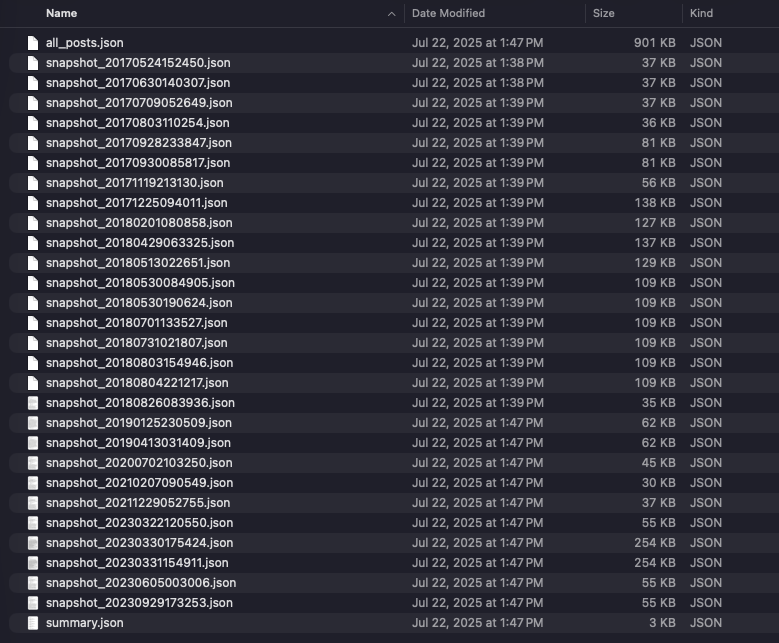
Great, now that we have all the times wayback scraped ln(exun), we can now begin individually requesting for snapshots after 2017. Time to bust out Cursor, and vibecode some scripts to scrape all these timestamps. By the end, I had all individual snapshots, a JSON with all posts and a summary.json (with the summary of everything scraped).

All these were consolidated properly into a nice lnexun_posts_import.xml file that could be imported into WordPress for all the remaining posts until end of 2022. Post that, all other posts were in blogger, which was a very simple export and import.

Amazing. We now have all the posts. 🙌

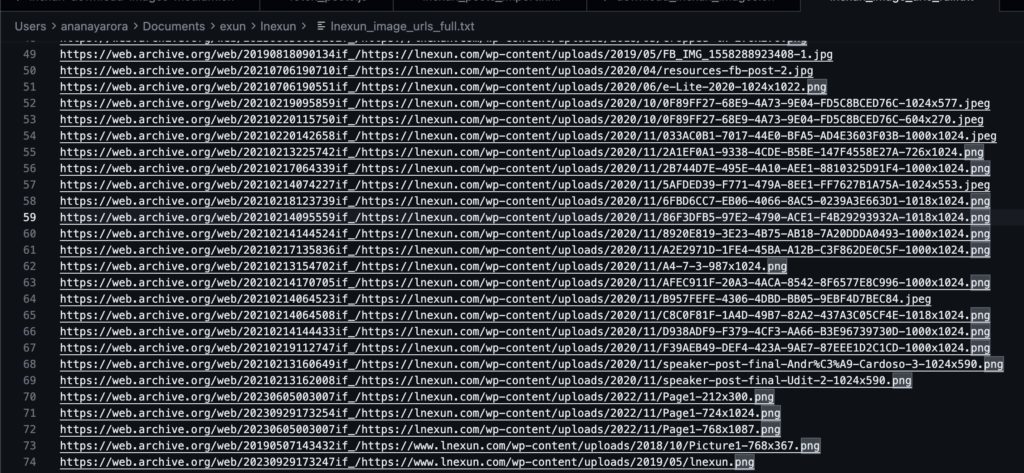
Now for the last piece, we just need the images from 2017 onwards. Wayback had them, so it was easy to just simply download the remaining images from the posts. Time to break out Cursor one last time and write a script to download all the remaining images and have them placed in the right folder.

🎉 Success! We have officially recovered all of ln(exun) at this point 🎉

This wasn’t a straight path forward, rather quite rocky. There was a lot of planning that went into this, lots of careful coordination and review making sure everything is perfectly pieced together.

There was also one failed attempt at using RSS feeds to get back everything, but RSS feeds didn’t have everything in them. All the authors were missing from these posts too, or atleast not mapped correctly to the posts when imported. More scripts were written for that as well and also required little bit of manual work.

I’m also genuinely impressed at how much time Cursor saved me here because writing those scripts could’ve taken me hours, it really did all the heavy lifting for me making the scraping a breeze.

Since there is no sensitive information here, I’ve gone ahead and open sourced all scripts and outputs if someone really wants to mess around with them.

Conclusion

This felt like Sudocrypt. Piecing together things, jumping through hurdles and getting to the answer, except this was more like hunting and piecing together back our natural log from all the fragments we could find. While I enjoyed doing this a lot and it taught me quite a bunch of stuff, this is something that should not happen again.

We recognize that current Exun members and faculty are busy with school and things like these can slip easily. Keeping this in mind, Exun Alumni Network (EAN) has taken over the responsibility to maintain lnexun.com. With our expertise and resources, we will be ensuring that lnexun stays online keeping our legacy alive.

A huge shoutout to Bharat Kashyap (President, Exun 2015) for setting up the hosting for ln(exun) 🙏

Signing off,

Ananay Arora
President, Exun Class of 2017

Ray Tracing: An insight into 3D design

What is Ray Tracing

Ray tracing is a rendering technique used to add realistic light effects in 3D scenes. It is a relatively advanced concept in computer graphics, and it has been used to create stunning visuals for decades. Ray tracing involves tracing the path of light as pixels in an image to simulate its effects such as the formation of shadows, reflections, etc.

History

The idea was first announced in the 16th century by Albrecht Dürer. One of the described techniques was what geometry is visible along a given ray, as is done with ray tracing.

Aurther Appel was the first to use a computer for ray tracing to generate shaded geometric pictures in 1968.

In 1971 Goldstein and Nagel published “3D visual simulation” in which ray tracing is used to make shaded pictures out of solids by simulating the photographic process in reverse.

The concept was also put to use in the early 1970s when it was used for the rendering of three-dimensional images in the movie “Futureworld.” 

Scott Roth created a flip book animation in Bob Sproull’s computer graphics course at Caltech in 1976. In Roth’s computer program, if a ray intersects a plane different from its neighbors, an edge point was noted. It’s true that rays can intersect more than one plane in space, but only the closest surface point is visible. The edges are jagged because the time-sharing DEC PDP-10 only had a coarse resolution. For the display of text and graphics there was a tektronix storage-tube called “terminal”. An image of the display was printed on rolling thermal paper by a printer attached to the display. Roth extended the framework and coined the term “ray casting” in the context of computer graphics and solid modeling.

In the 1980s, ray tracing was further refined, leading to the development of the RenderMan software used in Hollywood films such as “Tron” and “Toy Story.” The increased realism of ray tracing allowed filmmakers to create more realistic and believable visuals for their films.

How it works

Ray tracing works by tracing the path of light rays from the camera through the virtual scene. As the rays encounter objects in the image, the color, texture, and other properties of the object are used to determine the color of the pixel and its effects in reality. The process is repeated as each pixel is processed and the scene is rendered.  

Where is it used

Ray tracing is used in movies, video games, and virtual reality applications. Movies such as Avatar and Gravity use ray tracing to create realistic visuals. Video games like Call of Duty and Battlefield use ray tracing to create realistic lighting and shadows. And virtual reality applications like Google Earth use ray tracing to create a realistic virtual world.  

How to use it

To use ray tracing, a 3D scene must be created in a 3D modeling program, such as Blender or Maya, and then rendered with a ray tracer, such as V-Ray or Arnold. The ray tracer then takes the 3D model and traces the path of light rays in the scene. Once the scene is rendered, the resulting image can be adjusted and tuned to get the look wanted by us.

The Ray Tracing Algorithm

Turner Whitted was the first to show recursive ray tracing for mirror reflection and for refraction through translucent objects, with an angle determined by the solid’s index of refraction, and to use ray tracing for anti-aliasing. Whitted also showed ray traced shadows. He produced a recursive ray-traced film called “The Compleat Angler” in 1979.  

The ray tracing algorithm is based on the concept of tracing the path of light from a specific source through a three-dimensional scene. It begins by tracing a single ray from the camera to a point in the scene, and then tracing the ray of light reflected from that point. The resulting ray is then traced to another point in the scene, and the process is repeated until the ray reaches the camera. This process is repeated for each pixel in the image, resulting in an accurate and realistic rendering of the scene.

How/Where is Ray Tracing used in Graphics Card 

Ray tracing is used in graphics cards to determine which pixels should be illuminated, and which should be left in the dark as it’s a crucial part of creating realistic lighting effects. Ray tracing can also be used to create more realistic reflections and refractions, which can be used to create more believable water and glass surfaces.

For graphics card manufacturers, ray tracing provides an efficient way of creating realistic images without having to resort to more traditional methods. By using ray tracing, graphics card manufacturers can reduce the amount of time it takes to render an image, as well as reducing the amount of power it requires. This helps to make graphics cards more energy-efficient, and can result in improved performance in games and other applications.

Advantages of Ray Tracing

First- ray tracing produces more realistic images due to its ability to simulate a wide range of natural phenomena such as reflection, refraction, shadows, and global illumination. This allows for a more realistic representation of light and shadow in 3D scenes, which is not possible with traditional rendering techniques.

Second- ray tracing can also be used to generate high-quality images in real-time. This makes it well-suited to applications such as virtual reality and augmented reality, where the user needs to interact with the environment in real-time.

Third- ray tracing is much more efficient than traditional rendering techniques. Traditional rendering techniques require significant amounts of computing power to render an image, whereas ray tracing requires significantly less computing power to produce the same result.

Lastly- ray tracing is incredibly versatile. It can be used for a wide range of 3D applications, from architectural renderings to medical imaging. It is also used in motion picture production and video game development.

Disadvantages of Ray Tracing 

The first issue is its high computational cost. Ray tracing requires a great deal of processing power to calculate the paths of light rays which are used to generate the realistic images. This makes it unsuitable for real-time applications, such as video games, where the rendering must be done quickly in order to produce a smooth experience. 

Another disadvantage of ray tracing is its dependence on large amounts of memory. The memory required to store the scene data and the data related to the light rays for rendering can be quite significant, making it difficult to render complex scenes. 

Finally, ray tracing is difficult to parallelize, making it less efficient in multi-core environments. Parallelization involves splitting up the workload to be processed across multiple cores, resulting in faster rendering times. However, due to the nature of ray tracing, this is not easily achievable. 

Global Illumination 

Global Illumination is a lighting technique used in 3D rendering that simulates more realistic lighting. This technique accounts for indirect illumination, or light bouncing off other surfaces in the scene. This allows for more realistic shadows, reflections, and diffuse lighting. Global Illumination also accounts for the color of light as it bounces off surfaces, creating more realistic lighting effects.

In order to accurately simulate Global Illumination, the rendering engine needs to solve the rendering equation. This equation uses direct lighting, indirect lighting, specular reflections, and diffuse reflections. By solving this equation, the engine can accurately simulate how light interacts with the 3D scene and create more realistic lighting effects. 

Global Illumination can be further enhanced by using techniques such as ray tracing and path tracing. These techniques allow the lighting engine to simulate more complex light interactions, such as caustics, reflection and refraction, and indirect occlusion.

– Saanvi Verma

Inauguration of AI innovation and incubation center by Union Education Minister.

On 13th November, 2025, the Union Education Minister, Mr. Dharmendra Pradhan, inaugurated the AI innovation and incubation center at Delhi Public School R.K. Puram. Under the mentorship of our principal, Mr. Anil Kumar, and our vice principals, Mr. Naresh Miglani, Mr. Anil Kathuria, Mr. Mukesh Kumar, and Mrs. Rashmi Malhotra, and empowered by a vision to instill in its students a technological temperament and curiosity,

Delhi Public School R.K. Puram remains a torchbearer, striving to uphold excellence. With a rich history spanning more than 50 years, our school has always been a relentless supporter of technological advancements. The AI Innovation and Incubation Centre is a new addition to the vast technological resources our school already possesses.

The AI innovation and incubation center, built in collaboration with VVDN Technologies, is powered by Google Cloud. It is equipped with a Unitree G1 humanoid and a Sony AIBO robotic dog, which, based on machine learning algorithms, can learn from its environment, showing how robotics and AI together can bring human-like behavior. The Innovation and Incubation Centre is also equipped with Apple- and Chrome-powered workstations, AI conferencing systems, and Google Cloud servers. The AI innovation and incubation center is an important resource that will prove to be a huge asset to our students, bringing technology into education.

The Human Imprint on Technology: Mr. Anil Kumar on Guiding Education Through an AI Awakening

As AI begins to move from being a mere tool to a creative and intellectual collaborator, how can schools meaningfully integrate it into learning while preserving human curiosity and originality—and how can students play an active role in shaping this evolution? 

Ans) AI will undoubtedly transform education, but the real question is whether we can guide that transformation to serve human intellect instead of replacing it. True progress would only be achieved when we learn how the two can strengthen each other. I have always been a strong believer that technology and artificial energy should be integrated more into education, but as a facilitator. Technology, no matter how advanced, must remain an instrument guided by human intention and conscience. It is we who built it, shaped its purpose, and set its boundaries. The moment it begins to dictate our choices or replace our curiosity, it stops being progress and starts becoming dependency. Artificial intelligence should assist human intellect, not overshadow it. From when fire was discovered to now possible colonisation of extraterrestrial planets, we have undertaken this journey of progress alone, with little assistance from artificial intelligence. Hence, our goal must always be to lead with wisdom, ensuring innovation amplifies our humanity rather than diminishes it. 

Nevertheless, we should always have an open mind when we talk about integrating AI in education. Redundant tasks should be given to such AI systems because they ensure that we can focus on more meaningful, strategic, and policy-driven decisions. Over the years, we have digitalised many aspects of education such as our app, which now centralises notices, marksheets, and other essential information. Each of these steps brings us closer to an ecosystem where technology handles the operational load, empowering humans to focus on vision, policy, and purpose.

Furthermore, now when we talk about creativity, it is important for us to realise how creativity and what it means is changing in today’s world. Recently, there was an art competition at the Colorado State Fair where Jason M. Allen’s Théâtre D’opéra Spatial won. He later admitted that he used AI image generator Midjourney to create it. This just goes to show how artificial intelligence has advanced, yet every bit of its ‘creativity’ originates from us. These systems receive millions of prompts every day, and with access to the vast pools of human intelligence and ideas, they build upon what we have created. AI does not invent from nothing—it mirrors the depth, diversity, and brilliance of the human mind that shaped it.

 What I feel is we must preserve our three-H’s, our heart, our head, and our hand. The heart gives emotions, the head reasons, and the hand undertakes action- and together they define true creativity. By relying too heavily on AI, we risk truncating these very faculties that make us human and are the very tenets of our progress and innovation. Technology should serve as an aid, not a replacement, ensuring that our creativity continues to stem from thought, feeling, and effort, rather than automation.

Students, too, can now play a more active role in the R&D of Artificial Intelligence. The idea of the new AI Lab in our school is to innovate and generate new ideas, and the human thinking part has to be done there. Students are the key drivers, and they can now reimagine the future of artificial intelligence, too. By engaging directly with AI research, students learn not just how to use technology, but how to question and shape it. It is in their curiosity and imagination that the next great leap in human–machine collaboration will be born.

At the end of it all, the real measure of progress will not be how intelligent our machines become, but how deeply we continue to think, feel, and create as humans. We stand at a turning point where technology can either sharpen our minds or soften them, depending on how we choose to use it. The challenge is to let AI expand the boundaries of what we can imagine, without letting it erode the instincts that make imagination possible. Our task is to stay curious, to keep questioning, and to remember that no algorithm can replace the pulse of a thinking, feeling mind.

Creating Innovators: Mr. Mukesh Kumar on Exun’s Legacy of Excellence

Exun has long been known for nurturing students who go on to excel in technology, research, and design. What do you think has enabled the club to sustain such a strong culture of curiosity and innovation over the years?

What makes Exun truly remarkable is that it’s entirely student-driven. Every new member joins with a unique skill set but shares the same spark — a deep curiosity and passion to learn. The club’s structure is fluid, allowing students to explore what excites them most — be it competitive programming, design, research, or hardware. There’s no rigid hierarchy; ideas flow freely, and learning happens through action. In that process, students not only uncover new technological possibilities but also discover more about themselves.

Beyond technical growth, Exun nurtures a sense of shared identity. It’s a space where collaboration triumphs over competition, where late-night brainstorming sessions evolve into lifelong friendships. Here, students don’t just learn to solve problems — they learn to question them. They begin to see technology as something creative, expressive, and profoundly human. The community constantly inspires one another to grow, while staying grounded in respect, curiosity, and a genuine desire to make a difference.

Another defining strength of Exun lies in its ability to bridge disciplines. Students from diverse domains — from design and debate to machine learning and cubing — come together to build projects that blur traditional boundaries. This interdisciplinary energy keeps the club dynamic and ever-evolving, reminding everyone that innovation doesn’t happen in isolation, but through the connection of ideas and the uniting of perspectives.

What I find most inspiring is how Exun transforms the way students perceive themselves and their work. Over time, they begin to see technology not merely as a skill, but as a medium — a means to solve real-world problems and express their ideas. That transformation — from learning something to creating with it — is what defines Exun at its very core. It’s not just a club about technology; it’s a community of belief — in ideas, in collaboration, and in the boundless potential of young minds to shape a more humane and hopeful tomorrow.

The Art of Discernment: Ms. Rashmi Malhotra Redefines Education

In an age where information is infinite and intelligence is automated, what, to you, does it truly mean to be educated?

To be educated today is to remain deeply human in a world that keeps redefining intelligence. In a time when facts are instantly available, being educated is less about retention and more about interpretation – knowing how to sift through the noise, recognize nuance, and find coherence where everything seems fragmented.

Education, to me, is the slow art of sense-making – the discipline of pausing before reacting, doubting before concluding, and questioning before accepting. It’s about cultivating depth in a culture that glorifies speed and awareness in a world built on distraction. An educated mind is one that can hold complexity without collapsing into certainty, one that can navigate contradiction without cynicism. That balance – of intellect and restraint -is what separates thought from reaction, and wisdom from mere cleverness.

Automation has made brilliance effortless; it has not made wisdom common. The real task of education now is to teach discernment – to help young people recognize what deserves their attention, and what doesn’t. That cannot be programmed. It’s a discipline of thought, empathy, and self-awareness – the ability to think clearly and feel deeply in equal measure.

So when I think of being educated, I think less of mastery and more of perspective – the ability to see patterns, contradictions, and possibilities all at once. In a world obsessed with answers, perhaps education’s highest purpose is to teach us to question. 

Technology with Thought: Mr. Anil Kathuria on Blending Digital Tools with Real-World Learning

In today’s digital era, where AI, virtual reality, and smart devices are reshaping industries, how is our school integrating emerging technologies into education while ensuring students remain grounded in real-world learning?

While technology is evolving rapidly, our school’s approach has been steady and thoughtful. We focus on integrating digital tools in ways that genuinely enhance teaching and learning, rather than using them for the sake of novelty. For example, our teachers use interactive platforms, smart boards, and online resources to make lessons more engaging and accessible. Students learn to research responsibly, collaborate on shared documents, and present their ideas using digital media – skills that are essential in today’s world. At the same time, we place great importance on maintaining balance. Face-to-face discussions, hands-on activities, and classroom interaction remain at the heart of our practice. We want students to think critically, communicate clearly, and develop interpersonal skills that no device can replace. We also make it a point to guide students in using technology safely and ethically, helping them understand both its benefits and its limits. Our aim is not to chase every new trend, but to prepare students to use emerging tools wisely – grounded in values, judgment, and real-world understanding.

Where Intelligence Ends, Wisdom Begins: Mr. Naresh Miglani on the Paradox of Progress

As technology grows more intelligent, do you think humanity is growing any wiser?

That question touches on the paradox of our age – we’ve never been more capable, and yet perhaps never more uncertain of what to do with that capability. Intelligence today has become measurable, programmable, and endlessly replicable. Wisdom, however, remains stubbornly human – it resists automation because it demands context, empathy, and restraint.

Technology can process, predict, and perform, but it cannot pause. Wisdom lives in that pause – in the hesitation before action, in the awareness that not everything that can be done should be done. We are surrounded by systems that can outthink us in speed, yet none that can match us in conscience. And that gap – between intelligence and intention – is where our responsibility now lies.

I don’t think humanity automatically becomes wiser as its tools become smarter. If anything, progress tempts us to confuse access with understanding, convenience with clarity. The challenge of this century is not keeping up with technology, but staying awake within it – ensuring that our inventions don’t dull the very capacities that made them possible: curiosity, discernment, wonder.

Wisdom demands a kind of humility that technology doesn’t teach. It asks us to remember that intelligence is only power, and power without direction can as easily destroy as it can transform. So perhaps the real question is not whether we are becoming wiser, but whether we are still willing to.

Because if intelligence is about building systems that think, wisdom is about building lives that matter. And that remains, for now, a profoundly human task.

The Human Spark in Programming: Ms. Hema Jain on Creativity Behind the Syntax

If code is just logic made visible, does that mean emotion and a human touch has no place in computer science? 

It would be naive to believe that programming is just logic. On the surface, it’s clean, structured, and exact. But behind every program is a person trying to make something work, trying to solve a problem that matters to them. That drive comes from varied emotions – curiosity, frustration, excitement, even obsession. The beauty of computing isn’t just in precision; it’s in the moments of chaos before clarity, when you’re experimenting, failing, and suddenly finding a solution. Machines can follow rules perfectly, but it’s emotion that makes us question those rules, imagine new ones, or visualise the final result where others see syntax. Even innovation itself often begins with a feeling – the sense that “this could be better.” or “this is possible”. Programs are made with a purpose by human beings for human beings, which makes all of this process inherently human. So yes, code might be logic made visible, but emotion is what makes it worth writing. Without that human spark, computer science would just be math – not magic. And maybe that’s the secret difference between a program that merely runs and one that truly creates impact. In the end, logic gives computers their structure, but emotion gives computer scientists their purpose. It’s what keeps us curious, restless, and endlessly willing to try again – until the logic finally feels right.

The Worlds We Build: Mr. Mohitendra Dey on Gaming and the Architecture of Evolving Minds

Do you think gaming is shaping how this generation thinks about logic, competition, and creativity- or is it just reflecting it? 

I think gaming reflects this generation far more than it shapes it. Games are, in a sense, mirrors- built from the collective imagination, desires, and frustrations of the people who play them. The logic in modern games mirrors how we think: fast, parallel, always multitasking.  That constant flow of information and decision-making feels familiar because it comes from our own lived reality -a reality filled with choices, distractions, and a constant need to adapt quickly. Gaming doesn’t create that rhythm; it translates it into play. The creativity we see in game design, from open worlds to nonlinear storytelling and the moral choice systems, all of this comes from a generation that questions structure and values freedom. Even competition in gaming feels less about domination and more about self-expression; people now play not only to prove themselves and their skills, but also to find community.

So, I see gaming as a kind of cultural feedback loop. It doesn’t tell us how to think – it reveals how we already do. Every mechanic, every narrative choice, is a reflection of our priorities as a society: our collective and constant pursuit of excellence, which drives our very progress.