Monthly Archives: December 2025

Bringing back ln(exun)

Every once in a while a website important to you goes down. It’s usually something mundane. Scheduled maintenance, a domain expiring, issues with DNS or some script kiddie taking over your WordPress install because you forgot to update that one WordPress plugin. It’s usually just a small hiccup that you can recover from, over coffee.

This, unfortunately, wasn’t just a hiccup. This was mayday. A word that is not to be used lightly. What happens when you forget to pay your hosting bill and the renewal emails get buried in your inbox? Well, we found out the hard way.

We lost all of ln(exun), permanently, after Bluehost terminated our hosting plan. All those posts dating back 20 years ago all permanently wiped.

Since I’m an alumni, I no longer managed the site actively. I was absolutely shocked and taken aback that all of it just got wiped. Mistakes happen, but right now it was time to salvage whatever we could. But the grief was real: all competition wins, underscore articles, the random stuff posted from 2005 – it was all gone.

Was this the end of the Natural Log of Exun?

• • • • •

Enter “backups”

I vaguely remembered that sometime back in the day I took an XML backup of lnexun’s WordPress. For the record, I have a practice of never deleting anything from my laptop. Instead, I believe in having a larger trash can and that’s how I now have a 2TB Mac which is also full 🫠

For context, WordPress backs up only text content in an XML file with the format “<site>.wordpress.<date>.xml” when you export it from their dashboard. I searched for that exact filename and I was blessed to be able to find a shiny 5.9 MB file called “lnexun.wordpress.2017-05-06.xml” that I backed up on May 6, 2017.

This was a very solid headstart. We have all posts until 2017, but the restoration isn’t complete. At this point we’re looking to restore all images uploaded to ln(exun) along with all posts after 2017. The goal is to get to 100% restoration – as much as we can push it.

Going way back via a different medium

You guessed it, we’re going wayyyyback. But before that, I recalled that we ported our site to Medium in 2018 temporarily as an experiment. This meant we had all posts until April 2018 along with all images until that date.

Thanks to GDPR, I was able to download my entire Medium account dump. This also included the ln(exun) medium publication which had all the posts in HTML.
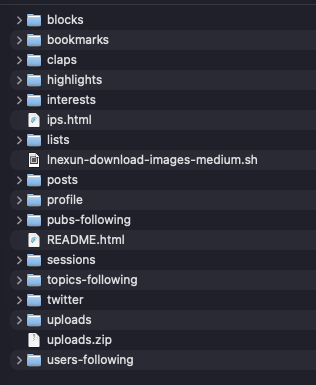
Every post was its own HTML file in the posts folder
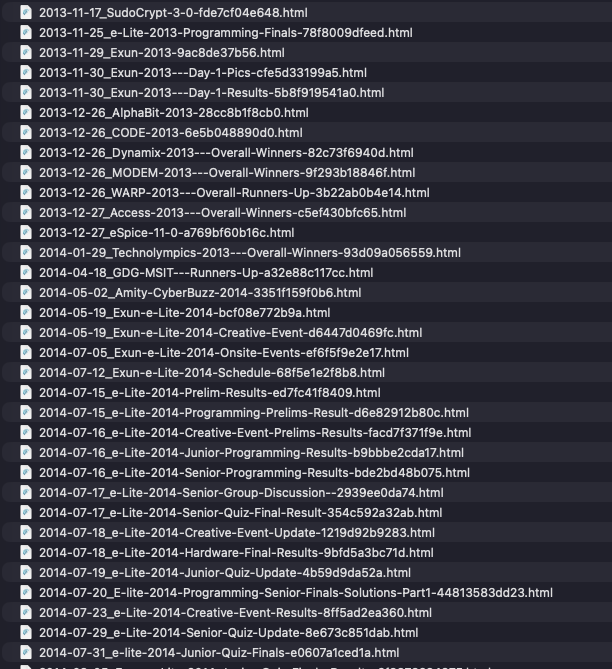
Looking at the HTML file, here is what an image tag looked like in all these HTML files.

<img class="graf-image" data-image-id="0*fycT_sxDuHbisPuV.jpg" data-width="1024" data-height="759" data-external-src="http://www.lnexun.com/wp-content/uploads/2015/10/Dynamix-Overall-1024x759.jpg" alt="Dynamix Overall" src="https://cdn-images-1.medium.com/max/800/0*fycT_sxDuHbisPuV.jpg">

Focusing on two very key attributes here, we have the src attribute which hosts it on the Medium CDN but most importantly we have the data-external-src attribute which tells me where that image was placed exactly at the time of export.

For context, if we can just put the correct images in the wp-content/uploads/<year>/<month>/<image_name> path we can retroactively have every single image working in every single post.

This was absolutely perfect. To sum it up we now have the images from Medium CDN’s and also the path where have to place them. It was now time to bust out Cursor and write that shell script to automatically scan for these tags, get the correct attributes, download the images and place them in the correct folder
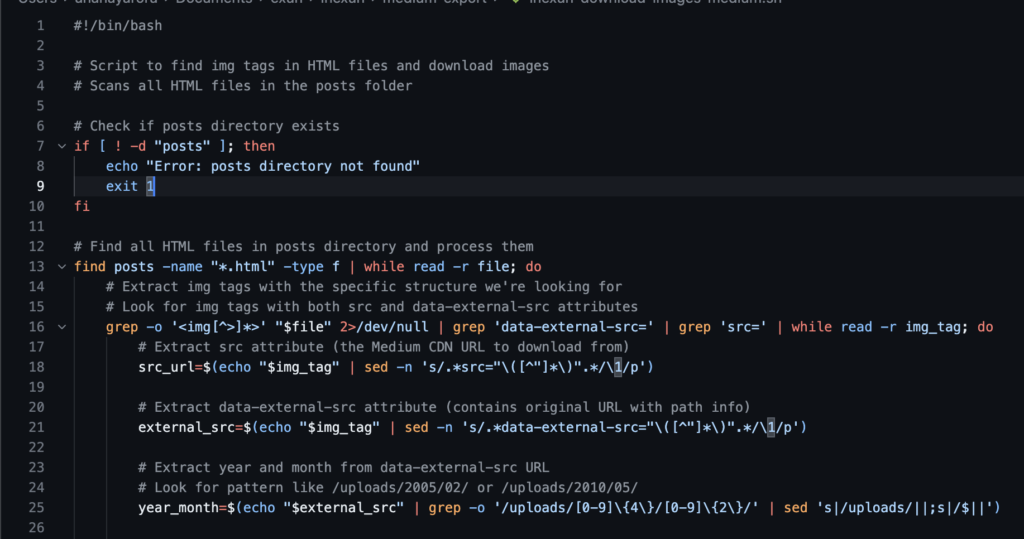
Amazing. We now have all the images until 2018 🎉

Actually going back to 2018

Now that we have all images until 2018 and posts until 2017, we can now get the rest. I didn’t want to export the remaining ~8 months of posts from the Medium between 2017 and 2018, since we’re actually going wayback here (the moment we’ve been waiting for) and we can get the rest in one pass.

The problem with the Wayback Machine is that every request is painfully slow, and there is no guarantee if we’ll find all the posts or not – but we’ll try our best. Internet Archive is always the last option.

To start off, we first need to know what times did the Wayback Machine index ln(exun). The wayback machine has the CDX API. CDX is a special index format and API that the Wayback system uses to list and look up archived captures of web pages.

Requesting ln(exun)’s CDX entries we see a bunch of times Wayback indexed ln(exun), in a not-so-neat JSON response.
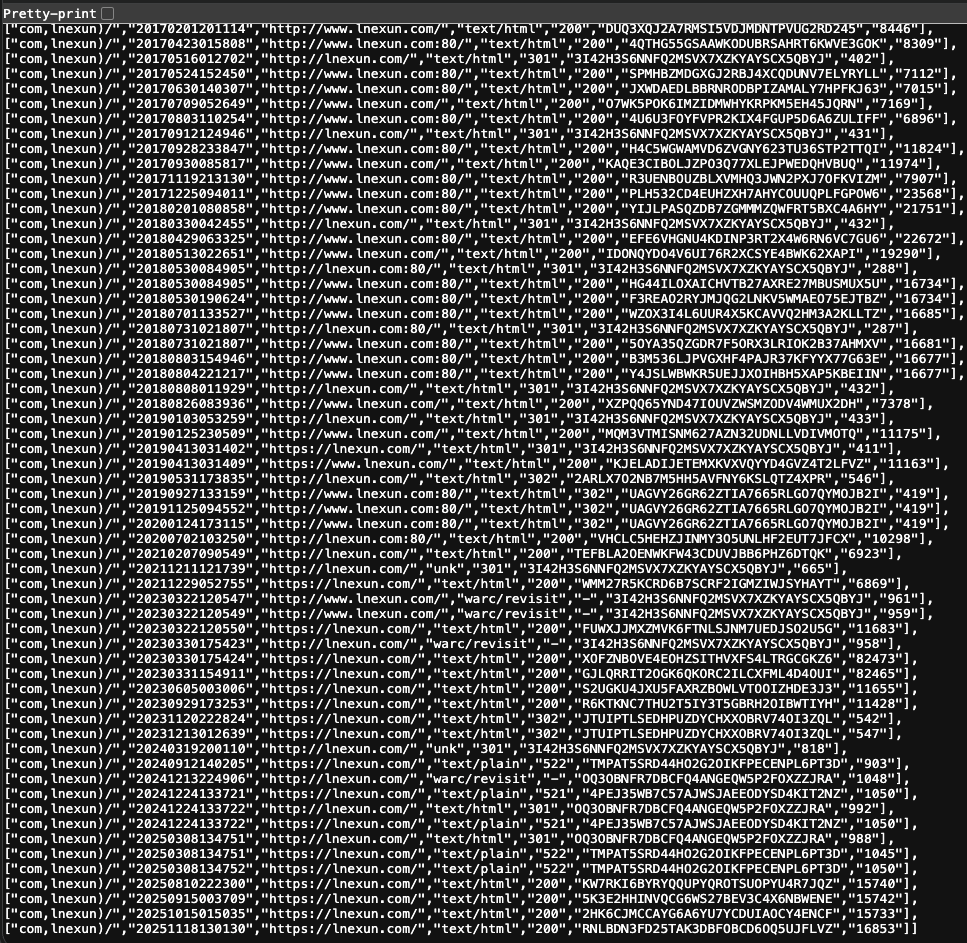
Great, now that we have all the times wayback scraped ln(exun), we can now begin individually requesting for snapshots after 2017. Time to bust out Cursor, and vibecode some scripts to scrape all these timestamps. By the end, I had all individual snapshots, a JSON with all posts and a summary.json (with the summary of everything scraped).
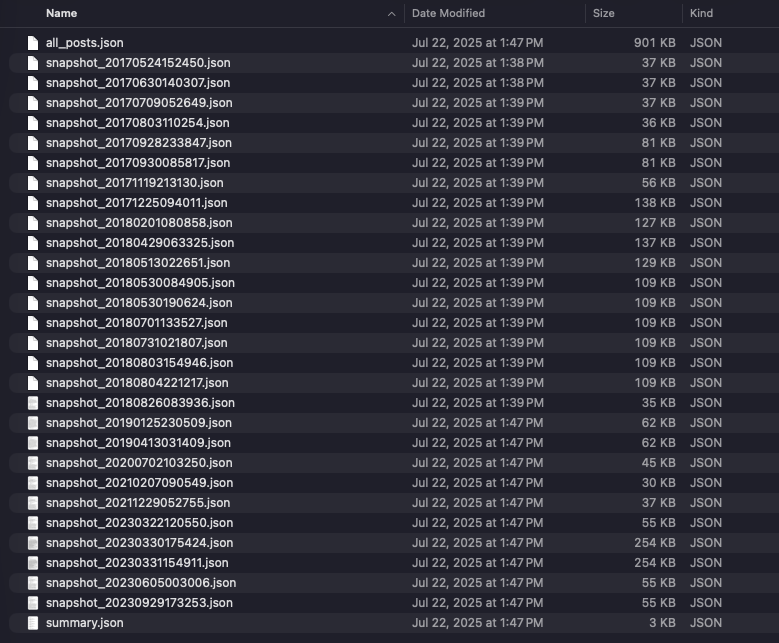
All these were consolidated properly into a nice lnexun_posts_import.xml file that could be imported into WordPress for all the remaining posts until end of 2022. Post that, all other posts were in blogger, which was a very simple export and import.

Amazing. We now have all the posts. 🙌

Now for the last piece, we just need the images from 2017 onwards. Wayback had them, so it was easy to just simply download the remaining images from the posts. Time to break out Cursor one last time and write a script to download all the remaining images and have them placed in the right folder.
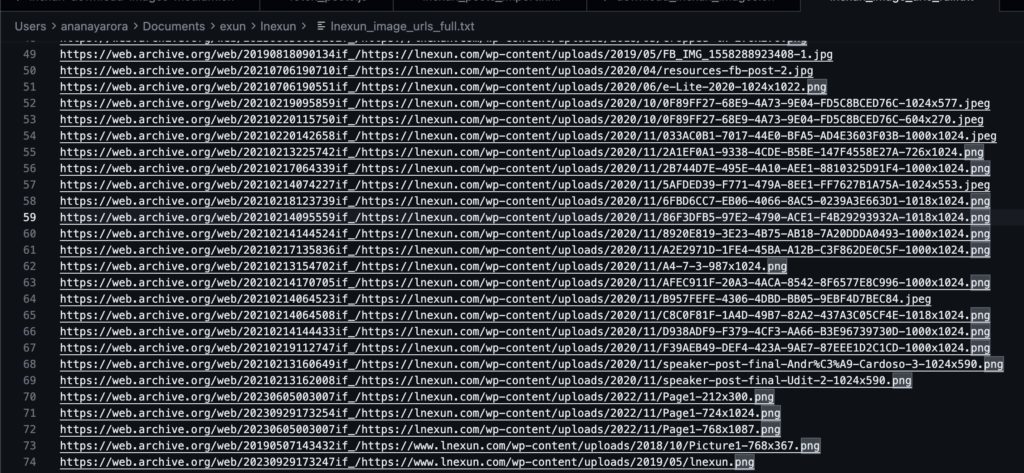
🎉 Success! We have officially recovered all of ln(exun) at this point 🎉

This wasn’t a straight path forward, rather quite rocky. There was a lot of planning that went into this, lots of careful coordination and review making sure everything is perfectly pieced together.

There was also one failed attempt at using RSS feeds to get back everything, but RSS feeds didn’t have everything in them. All the authors were missing from these posts too, or atleast not mapped correctly to the posts when imported. More scripts were written for that as well and also required little bit of manual work.

I’m also genuinely impressed at how much time Cursor saved me here because writing those scripts could’ve taken me hours, it really did all the heavy lifting for me making the scraping a breeze.

Since there is no sensitive information here, I’ve gone ahead and open sourced all scripts and outputs if someone really wants to mess around with them.

Conclusion

This felt like Sudocrypt. Piecing together things, jumping through hurdles and getting to the answer, except this was more like hunting and piecing together back our natural log from all the fragments we could find. While I enjoyed doing this a lot and it taught me quite a bunch of stuff, this is something that should not happen again.

We recognize that current Exun members and faculty are busy with school and things like these can slip easily. Keeping this in mind, Exun Alumni Network (EAN) has taken over the responsibility to maintain lnexun.com. With our expertise and resources, we will be ensuring that lnexun stays online keeping our legacy alive.

A huge shoutout to Bharat Kashyap (President, Exun 2015) for setting up the hosting for ln(exun) 🙏

Signing off,

Ananay Arora
President, Exun Class of 2017

Ray Tracing: An insight into 3D design

What is Ray Tracing

Ray tracing is a rendering technique used to add realistic light effects in 3D scenes. It is a relatively advanced concept in computer graphics, and it has been used to create stunning visuals for decades. Ray tracing involves tracing the path of light as pixels in an image to simulate its effects such as the formation of shadows, reflections, etc.

History

The idea was first announced in the 16th century by Albrecht Dürer. One of the described techniques was what geometry is visible along a given ray, as is done with ray tracing.

Aurther Appel was the first to use a computer for ray tracing to generate shaded geometric pictures in 1968.

In 1971 Goldstein and Nagel published “3D visual simulation” in which ray tracing is used to make shaded pictures out of solids by simulating the photographic process in reverse.

The concept was also put to use in the early 1970s when it was used for the rendering of three-dimensional images in the movie “Futureworld.” 

Scott Roth created a flip book animation in Bob Sproull’s computer graphics course at Caltech in 1976. In Roth’s computer program, if a ray intersects a plane different from its neighbors, an edge point was noted. It’s true that rays can intersect more than one plane in space, but only the closest surface point is visible. The edges are jagged because the time-sharing DEC PDP-10 only had a coarse resolution. For the display of text and graphics there was a tektronix storage-tube called “terminal”. An image of the display was printed on rolling thermal paper by a printer attached to the display. Roth extended the framework and coined the term “ray casting” in the context of computer graphics and solid modeling.

In the 1980s, ray tracing was further refined, leading to the development of the RenderMan software used in Hollywood films such as “Tron” and “Toy Story.” The increased realism of ray tracing allowed filmmakers to create more realistic and believable visuals for their films.

How it works

Ray tracing works by tracing the path of light rays from the camera through the virtual scene. As the rays encounter objects in the image, the color, texture, and other properties of the object are used to determine the color of the pixel and its effects in reality. The process is repeated as each pixel is processed and the scene is rendered.  

Where is it used

Ray tracing is used in movies, video games, and virtual reality applications. Movies such as Avatar and Gravity use ray tracing to create realistic visuals. Video games like Call of Duty and Battlefield use ray tracing to create realistic lighting and shadows. And virtual reality applications like Google Earth use ray tracing to create a realistic virtual world.  

How to use it

To use ray tracing, a 3D scene must be created in a 3D modeling program, such as Blender or Maya, and then rendered with a ray tracer, such as V-Ray or Arnold. The ray tracer then takes the 3D model and traces the path of light rays in the scene. Once the scene is rendered, the resulting image can be adjusted and tuned to get the look wanted by us.

The Ray Tracing Algorithm

Turner Whitted was the first to show recursive ray tracing for mirror reflection and for refraction through translucent objects, with an angle determined by the solid’s index of refraction, and to use ray tracing for anti-aliasing. Whitted also showed ray traced shadows. He produced a recursive ray-traced film called “The Compleat Angler” in 1979.  

The ray tracing algorithm is based on the concept of tracing the path of light from a specific source through a three-dimensional scene. It begins by tracing a single ray from the camera to a point in the scene, and then tracing the ray of light reflected from that point. The resulting ray is then traced to another point in the scene, and the process is repeated until the ray reaches the camera. This process is repeated for each pixel in the image, resulting in an accurate and realistic rendering of the scene.

How/Where is Ray Tracing used in Graphics Card 

Ray tracing is used in graphics cards to determine which pixels should be illuminated, and which should be left in the dark as it’s a crucial part of creating realistic lighting effects. Ray tracing can also be used to create more realistic reflections and refractions, which can be used to create more believable water and glass surfaces.

For graphics card manufacturers, ray tracing provides an efficient way of creating realistic images without having to resort to more traditional methods. By using ray tracing, graphics card manufacturers can reduce the amount of time it takes to render an image, as well as reducing the amount of power it requires. This helps to make graphics cards more energy-efficient, and can result in improved performance in games and other applications.

Advantages of Ray Tracing

First- ray tracing produces more realistic images due to its ability to simulate a wide range of natural phenomena such as reflection, refraction, shadows, and global illumination. This allows for a more realistic representation of light and shadow in 3D scenes, which is not possible with traditional rendering techniques.

Second- ray tracing can also be used to generate high-quality images in real-time. This makes it well-suited to applications such as virtual reality and augmented reality, where the user needs to interact with the environment in real-time.

Third- ray tracing is much more efficient than traditional rendering techniques. Traditional rendering techniques require significant amounts of computing power to render an image, whereas ray tracing requires significantly less computing power to produce the same result.

Lastly- ray tracing is incredibly versatile. It can be used for a wide range of 3D applications, from architectural renderings to medical imaging. It is also used in motion picture production and video game development.

Disadvantages of Ray Tracing 

The first issue is its high computational cost. Ray tracing requires a great deal of processing power to calculate the paths of light rays which are used to generate the realistic images. This makes it unsuitable for real-time applications, such as video games, where the rendering must be done quickly in order to produce a smooth experience. 

Another disadvantage of ray tracing is its dependence on large amounts of memory. The memory required to store the scene data and the data related to the light rays for rendering can be quite significant, making it difficult to render complex scenes. 

Finally, ray tracing is difficult to parallelize, making it less efficient in multi-core environments. Parallelization involves splitting up the workload to be processed across multiple cores, resulting in faster rendering times. However, due to the nature of ray tracing, this is not easily achievable. 

Global Illumination 

Global Illumination is a lighting technique used in 3D rendering that simulates more realistic lighting. This technique accounts for indirect illumination, or light bouncing off other surfaces in the scene. This allows for more realistic shadows, reflections, and diffuse lighting. Global Illumination also accounts for the color of light as it bounces off surfaces, creating more realistic lighting effects.

In order to accurately simulate Global Illumination, the rendering engine needs to solve the rendering equation. This equation uses direct lighting, indirect lighting, specular reflections, and diffuse reflections. By solving this equation, the engine can accurately simulate how light interacts with the 3D scene and create more realistic lighting effects. 

Global Illumination can be further enhanced by using techniques such as ray tracing and path tracing. These techniques allow the lighting engine to simulate more complex light interactions, such as caustics, reflection and refraction, and indirect occlusion.

– Saanvi Verma